
About
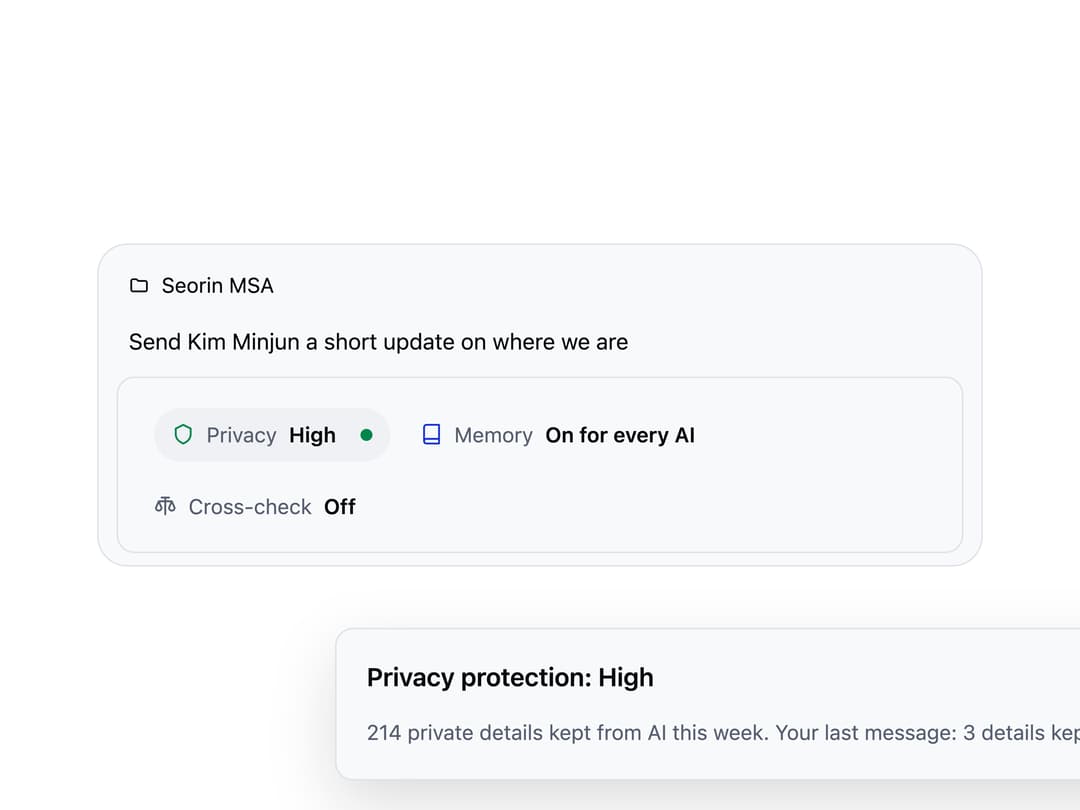
A row of toggleable status pills shown above a chat composer that discloses privacy, memory, and cross-check settings before a message is sent, each opening its own floating panel.
Built with React and Tailwind. Copy the prompt and paste it into Claude Code, Cursor or Lovable: your agent adds Composer Status to your project and fits it to your theme.
Code
How Composer Status is used: the demo's code. The component's own source comes with a free account.
Usage.tsx
"use client";

import * as React from "react";
import ComposerStatus from "@/components/ui/composer-status";

function DotIcon() {
  return (
    <svg
      width="15"
      height="15"
      viewBox="0 0 24 24"
      fill="none"
      stroke="currentColor"
      strokeWidth="2"
      strokeLinecap="round"
      strokeLinejoin="round"
    >
      <path d="M12 2 4 6v6c0 5 3.5 8 8 10 4.5-2 8-5 8-10V6l-8-4Z" />
    </svg>
  );
}

function BookIcon() {
  return (
    <svg
      width="15"
      height="15"
      viewBox="0 0 24 24"
      fill="none"
      stroke="currentColor"
      strokeWidth="2"
      strokeLinecap="round"
      strokeLinejoin="round"
    >
      <path d="M4 19.5A2.5 2.5 0 0 1 6.5 17H20" />
      <path d="M6.5 2H20v20H6.5A2.5 2.5 0 0 1 4 19.5v-15A2.5 2.5 0 0 1 6.5 2Z" />
    </svg>
  );
}

function ScaleIcon() {
  return (
    <svg
      width="15"
      height="15"
      viewBox="0 0 24 24"
      fill="none"
      stroke="currentColor"
      strokeWidth="2"
      strokeLinecap="round"
      strokeLinejoin="round"
    >
      <path d="M12 3v18M5 7l-3 7a3 3 0 0 0 6 0ZM19 7l-3 7a3 3 0 0 0 6 0ZM5 7h14M8 3h8" />
    </svg>
  );
}

function FolderIcon() {
  return (
    <svg
      width="14"
      height="14"
      viewBox="0 0 24 24"
      fill="none"
      stroke="currentColor"
      strokeWidth="2"
      strokeLinecap="round"
      strokeLinejoin="round"
    >
      <path d="M3 7a2 2 0 0 1 2-2h4l2 2h8a2 2 0 0 1 2 2v8a2 2 0 0 1-2 2H5a2 2 0 0 1-2-2Z" />
    </svg>
  );
}

function Panel({ title, children }) {
  return (
    <div style={{ display: "flex", flexDirection: "column", gap: 12 }}>
      <h3
        style={{
          margin: 0,
          fontSize: 17,
          fontWeight: 600,
          color: "var(--ink-primary)",
        }}
      >
        {title}
      </h3>
      <div
        style={{
          fontSize: 14,
          lineHeight: "22px",
          color: "var(--ink-secondary)",
        }}
      >
        {children}
      </div>
    </div>
  );
}

export default function ComposerStatusDemo() {
  const [memory, setMemory] = React.useState("project");

  const items = [
    {
      id: "privacy",
      icon: <DotIcon />,
      tone: "safe",
      name: "Privacy",
      value: "High",
      level: { n: 2, of: 3 },
      live: "Running on this laptop",
      panel: (
        <Panel title="Privacy protection: High">
          214 private details kept from AI this week. Your last message: 3
          details kept private.
        </Panel>
      ),
    },
    {
      id: "memory",
      icon: <BookIcon />,
      tone: memory === "none" ? "plain" : "on",
      name: "Memory",
      value: memory === "none" ? "Off" : "On for every AI",
      panel: (
        <Panel title="Memory">
          <div style={{ display: "flex", flexDirection: "column", gap: 8 }}>
            {[
              {
                value: "project",
                label: "This project",
                detail: "12 notes about Seorin MSA",
              },
              {
                value: "all",
                label: "All my work",
                detail: "Also 31 notes on how you like to work",
              },
              {
                value: "none",
                label: "Off for this chat",
                detail: "Nothing is read, and nothing is saved",
              },
            ].map((opt) => (
              <button
                key={opt.value}
                type="button"
                onClick={() => setMemory(opt.value)}
                style={{
                  textAlign: "left",
                  padding: "10px 12px",
                  borderRadius: 10,
                  border:
                    memory === opt.value
                      ? "1px solid var(--ink-brand)"
                      : "1px solid var(--border-subtle)",
                  background: "transparent",
                  cursor: "pointer",
                  color: "var(--ink-primary)",
                }}
              >
                <div style={{ fontWeight: 600, fontSize: 14 }}>{opt.label}</div>
                <div style={{ fontSize: 12, color: "var(--ink-secondary)" }}>
                  {opt.detail}
                </div>
              </button>
            ))}
          </div>
        </Panel>
      ),
    },
    {
      id: "check",
      icon: <ScaleIcon />,
      tone: "plain",
      name: "Cross-check",
      value: "Off",
      panel: (
        <Panel title="Cross-check">
          Have a second AI check this answer before it is sent. Every check says
          which AI ran it.
        </Panel>
      ),
    },
  ];

  return (
    <div
      style={{ width: "100%", maxWidth: 640, margin: "0 auto", padding: 24 }}
    >
      <div
        style={{
          display: "flex",
          flexDirection: "column",
          gap: 8,
          padding: "12px 12px 8px",
          border: "1px solid var(--border-subtle)",
          borderRadius: 20,
          background: "var(--surface-raised)",
        }}
      >
        <div
          style={{
            display: "flex",
            alignItems: "center",
            gap: 8,
            fontSize: 14,
            color: "var(--ink-primary)",
            padding: "4px 8px",
          }}
        >
          <FolderIcon />
          <span>Seorin MSA</span>
        </div>
        <div
          style={{
            fontSize: 15,
            color: "var(--ink-primary)",
            padding: "4px 8px",
          }}
        >
          Send Kim Minjun a short update on where we are
        </div>
        <ComposerStatus items={items} defaultOpen="privacy" />
      </div>
    </div>
  );
}
More by redrob-labs
View all
Alert
18
Schedule Picker
15
Hero Section
7
Switch
5
Status Card
4
Meter
2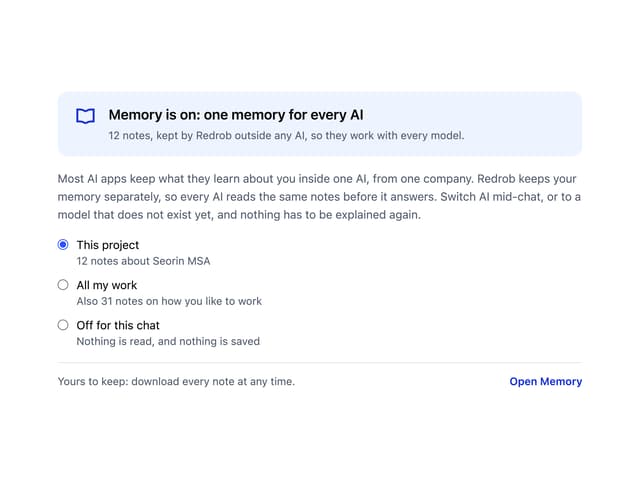
Memory Scope
2
Accordion
2