
About
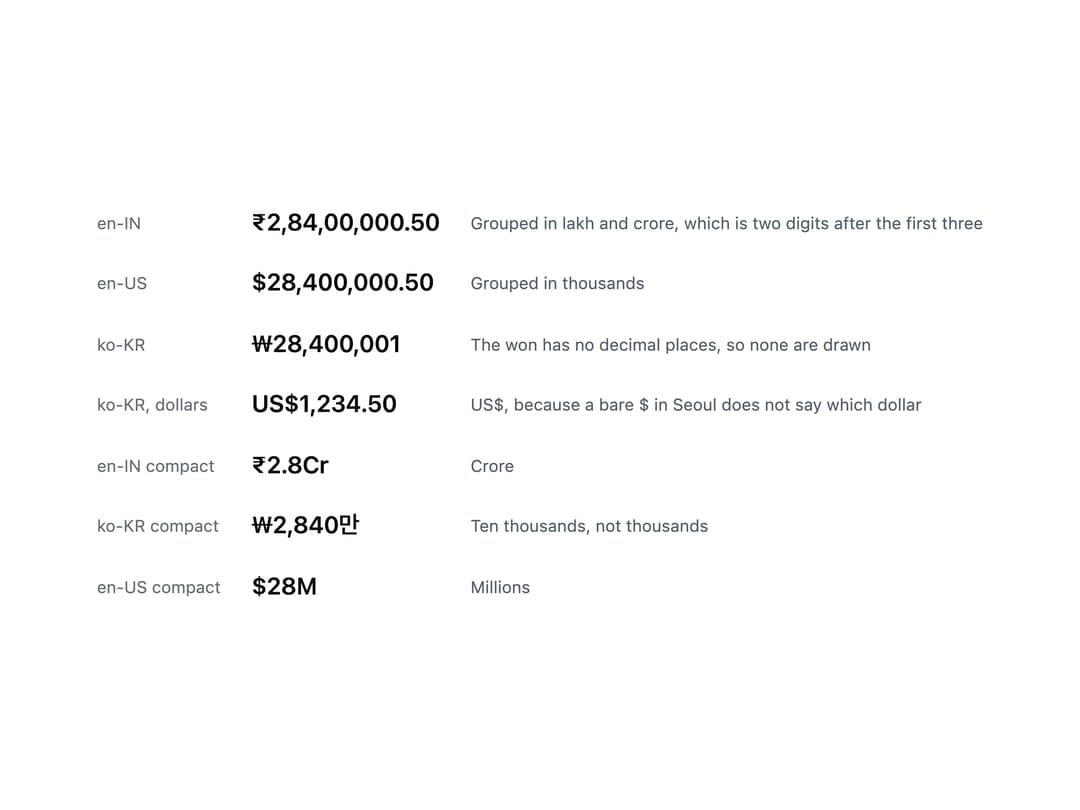
A text component that renders a currency amount formatted to the reader's own locale convention (grouping, decimals, compact notation, and currency symbol placement), using the native Intl API.
Built with React and Tailwind. Copy the prompt and paste it into Claude Code, Cursor or Lovable: your agent adds Money to your project and fits it to your theme.
Code
How Money is used: the demo's code. The component's own source comes with a free account.
Usage.tsx
import Money from "@/components/ui/money";

const rows: Array<{
  label: string;
  amount: number;
  currency: string;
  locale: string;
  compact?: boolean;
  note: string;
}> = [
  {
    label: "en-IN",
    amount: 28400000.5,
    currency: "INR",
    locale: "en-IN",
    note: "Grouped in lakh and crore, which is two digits after the first three",
  },
  {
    label: "en-US",
    amount: 28400000.5,
    currency: "USD",
    locale: "en-US",
    note: "Grouped in thousands",
  },
  {
    label: "ko-KR",
    amount: 28400001,
    currency: "KRW",
    locale: "ko-KR",
    note: "The won has no decimal places, so none are drawn",
  },
  {
    label: "ko-KR, dollars",
    amount: 1234.5,
    currency: "USD",
    locale: "ko-KR",
    note: "US$, because a bare $ in Seoul does not say which dollar",
  },
  {
    label: "en-IN compact",
    amount: 28400000,
    currency: "INR",
    locale: "en-IN",
    compact: true,
    note: "Crore",
  },
  {
    label: "ko-KR compact",
    amount: 28400000,
    currency: "KRW",
    locale: "ko-KR",
    compact: true,
    note: "Ten thousands, not thousands",
  },
  {
    label: "en-US compact",
    amount: 28400000,
    currency: "USD",
    locale: "en-US",
    compact: true,
    note: "Millions",
  },
];

export default function MoneyDemo() {
  return (
    <div
      style={{
        padding: 28,
        fontFamily: "var(--font-sans)",
        color: "var(--ink-primary)",
      }}
    >
      <table style={{ borderCollapse: "collapse" }}>
        <tbody>
          {rows.map((r) => (
            <tr key={r.label}>
              <td
                style={{
                  padding: "9px 22px 9px 0",
                  fontSize: 12,
                  color: "var(--ink-muted)",
                  whiteSpace: "nowrap",
                }}
              >
                {r.label}
              </td>
              <td
                style={{
                  padding: "9px 22px 9px 0",
                  fontSize: 17,
                  fontWeight: 600,
                }}
              >
                <Money
                  amount={r.amount}
                  currency={r.currency}
                  locale={r.locale}
                  compact={r.compact}
                />
              </td>
              <td
                style={{
                  padding: "9px 0",
                  fontSize: 12,
                  color: "var(--ink-secondary)",
                }}
              >
                {r.note}
              </td>
            </tr>
          ))}
        </tbody>
      </table>
    </div>
  );
}
More by redrob-labs
View all
Alert
18
Schedule Picker
15
Hero Section
7
Switch
5
Status Card
4
Meter
2
Memory Scope
2
Accordion
2