
About
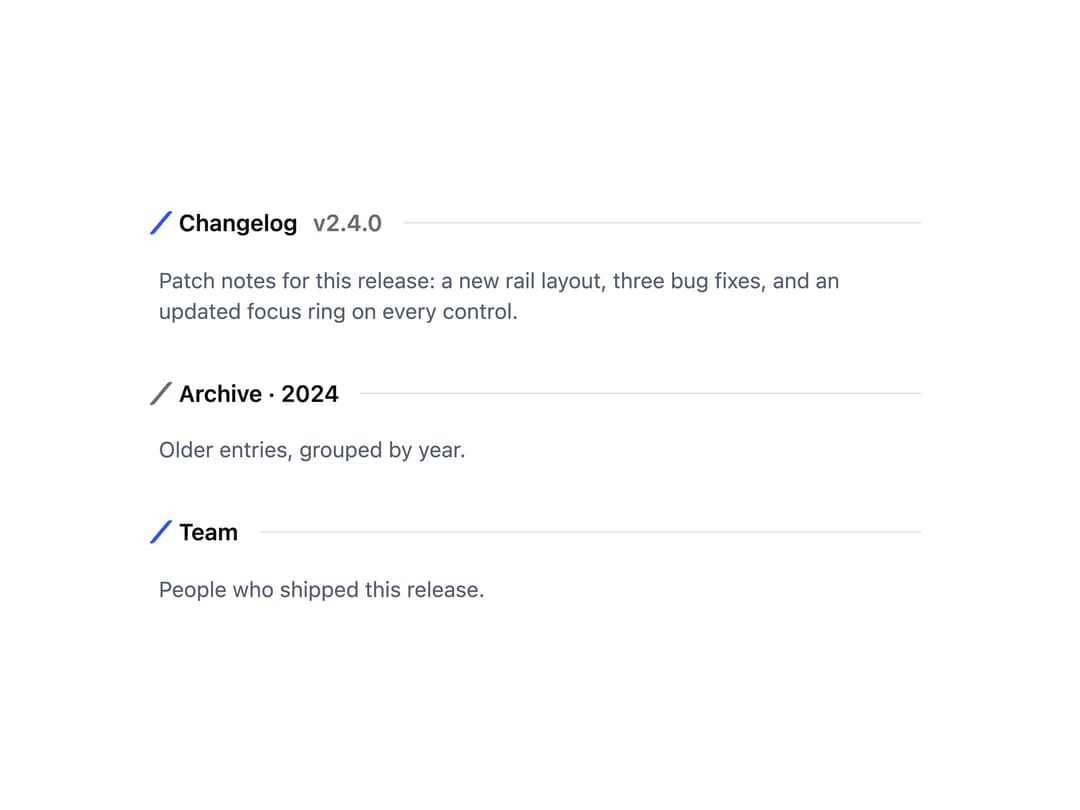
A small heading-like element pairing a short rotated tick mark with a label and trailing hairline, used to open a section or group of content.
Built with React and Tailwind. Copy the prompt and paste it into Claude Code, Cursor or Lovable: your agent adds Section Mark to your project and fits it to your theme.
Code
How Section Mark is used: the demo's code. The component's own source comes with a free account.
Usage.tsx
import SectionMark from "@/components/ui/section-mark";

export default function SectionMarkDemo() {
  return (
    <div
      className="w-full max-w-xl mx-auto p-10"
      style={{ background: "var(--surface-base)", color: "var(--ink-primary)" }}
    >
      <div className="flex flex-col gap-8">
        <div>
          <SectionMark label="Changelog" trailing="v2.4.0" />
          <p className="mt-4 text-sm" style={{ color: "var(--ink-secondary)" }}>
            Patch notes for this release: a new rail layout, three bug fixes,
            and an updated focus ring on every control.
          </p>
        </div>
        <div>
          <SectionMark label={["Archive", "2024"]} tone="muted" />
          <p className="mt-4 text-sm" style={{ color: "var(--ink-secondary)" }}>
            Older entries, grouped by year.
          </p>
        </div>
        <div>
          <SectionMark as="heading" level={2} label="Team" />
          <p className="mt-4 text-sm" style={{ color: "var(--ink-secondary)" }}>
            People who shipped this release.
          </p>
        </div>
      </div>
    </div>
  );
}
More by redrob-labs
View all
Alert
18
Schedule Picker
15
Hero Section
7
Switch
5
Status Card
4
Meter
2
Memory Scope
2
Accordion
2