
About
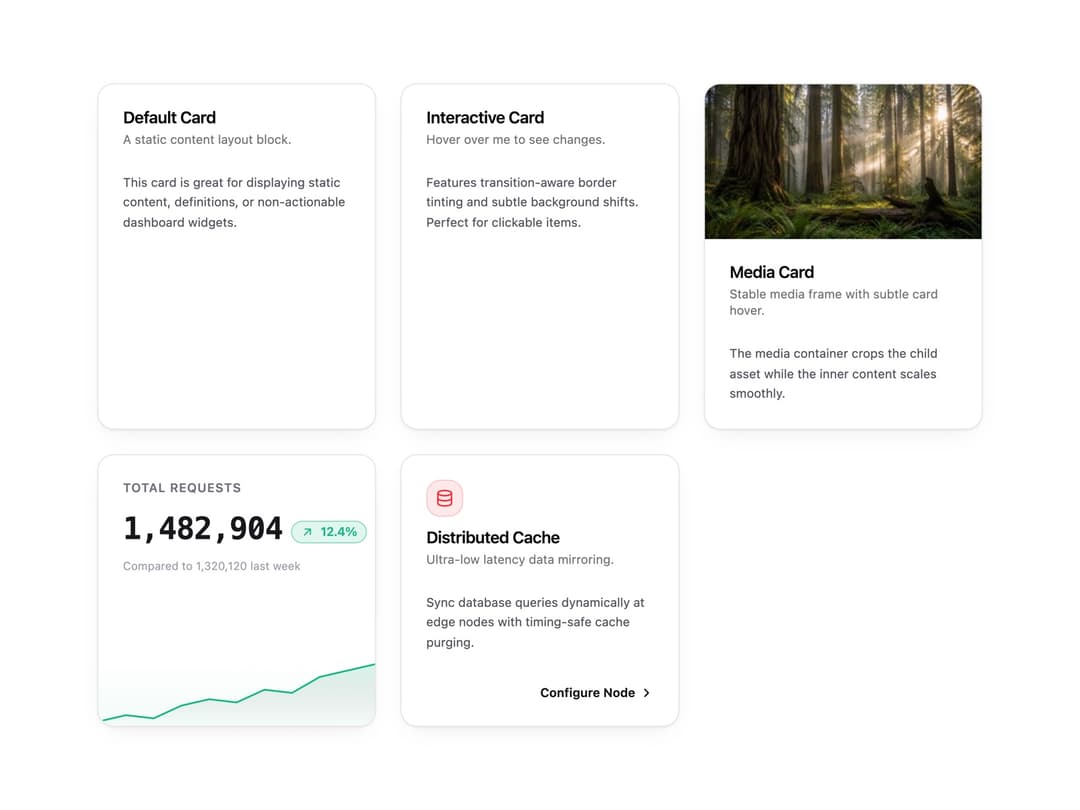
Content cards for stats, KPIs with sparklines, media, features and interactive surfaces. Header, content and footer slots make it easy to build dashboards and pricing grids.
Built with React and Tailwind. Copy the prompt and paste it into Claude Code, Cursor or Lovable: your agent adds Card to your project and fits it to your theme.
Code
How Card is used: the demo's code. The component's own source comes with a free account.
Usage.tsx
"use client";

import * as React from "react";
import { Card, CardHeader, CardTitle, CardDescription, CardContent, CardFooter, CardMedia, CardStatTrend, CardStatSparkline, CardFeatureAction } from "@/components/ui/card";
import { IconDatabase } from "@tabler/icons-react";

export function CardPreview() {
  return (
    <div className="grid w-full max-w-4xl grid-cols-1 gap-6 p-4 md:grid-cols-2 lg:grid-cols-3">
      {/* 1. Default Card */}
      <Card>
        <CardHeader>
          <CardTitle>Default Card</CardTitle>
          <CardDescription>A static content layout block.</CardDescription>
        </CardHeader>
        <CardContent>
          <p className="text-xs text-zinc-600 dark:text-zinc-400 leading-relaxed">
            This card is great for displaying static content, definitions, or non-actionable dashboard widgets.
          </p>
        </CardContent>
      </Card>

      {/* 2. Interactive Card */}
      <Card interactive>
        <CardHeader>
          <CardTitle>Interactive Card</CardTitle>
          <CardDescription>Hover over me to see changes.</CardDescription>
        </CardHeader>
        <CardContent>
          <p className="text-xs text-zinc-600 dark:text-zinc-400 leading-relaxed">
            Features transition-aware border tinting and subtle background shifts. Perfect for clickable items.
          </p>
        </CardContent>
      </Card>

      {/* 3. Media Card */}
      <Card interactive>
        <CardMedia aspectRatio="video" hoverZoom>
          <img
            src="https://cdn.21st.dev/assets/mirror/dd/dd78f3a2d7ca0cda5932fe0412de78798d5b0fd16aac0c6b37acc2ec6b9a682b.webp"
            alt="Sunbeams through a redwood forest"
          />
        </CardMedia>
        <CardHeader>
          <CardTitle>Media Card</CardTitle>
          <CardDescription>Stable media frame with subtle card hover.</CardDescription>
        </CardHeader>
        <CardContent>
          <p className="text-xs text-zinc-600 dark:text-zinc-400 leading-relaxed">
            The media container crops the child asset while the inner content scales smoothly.
          </p>
        </CardContent>
      </Card>

      {/* 4. Stat Card */}
      <Card interactive className="flex flex-col h-full justify-between">
        <CardHeader className="pb-0">
          <CardTitle className="text-xs font-semibold uppercase tracking-wider text-zinc-500 dark:text-zinc-400">
            Total Requests
          </CardTitle>
          <div className="mt-2 flex items-baseline gap-2">
            <span className="text-3xl font-bold font-mono tracking-tight text-zinc-900 dark:text-zinc-50">
              1,482,904
            </span>
            <CardStatTrend value="12.4%" trend="up" />
          </div>
          <p className="mt-1 text-[11px] text-zinc-400 dark:text-zinc-500">
            Compared to 1,320,120 last week
          </p>
        </CardHeader>
        {/* Full-bleed bottom sparkline */}
        <div className="w-full mt-6 overflow-hidden rounded-b-2xl h-16 bg-gradient-to-t from-emerald-500/5 to-transparent">
          <CardStatSparkline
            data={[12, 14, 13, 17, 19, 18, 22, 21, 26, 28, 30]}
            trend="up"
            width={280}
            height={64}
            className="w-full h-full"
          />
        </div>
      </Card>

      {/* 5. Feature Card */}
      <Card interactive>
        <CardHeader>
          <div className="inline-flex size-9 items-center justify-center rounded-xl bg-red-500/10 text-red-500 dark:text-red-400 border border-red-500/20 mb-3">
            <IconDatabase className="size-5" stroke={1.8} />
          </div>
          <CardTitle>Distributed Cache</CardTitle>
          <CardDescription>Ultra-low latency data mirroring.</CardDescription>
        </CardHeader>
        <CardContent>
          <p className="text-xs text-zinc-600 dark:text-zinc-400 leading-relaxed">
            Sync database queries dynamically at edge nodes with timing-safe cache purging.
          </p>
        </CardContent>
        <CardFooter className="pt-2 justify-end">
          <CardFeatureAction label="Configure Node" />
        </CardFooter>
      </Card>
    </div>
  );
}

/* ─── Individual Examples ──────────────────────────────────── */

export default function Demo() {
  return <CardPreview />;
}
Dependencies
More by Wensity Labs
View all

Sidebar
234
Calendar
173
Button
76
Color Picker
64
Image Comparison Slider
55
AI Prompt Input
50
Text Morphing
37
Navigation Menu
36
More in Cards
View all

Statistics Card 2
264

Course Design Cards
1.1K
Card
70
Stats cards with links
39
The Item one
3

Card Studio
7
Statistics Card 7
292

Item
10
