About
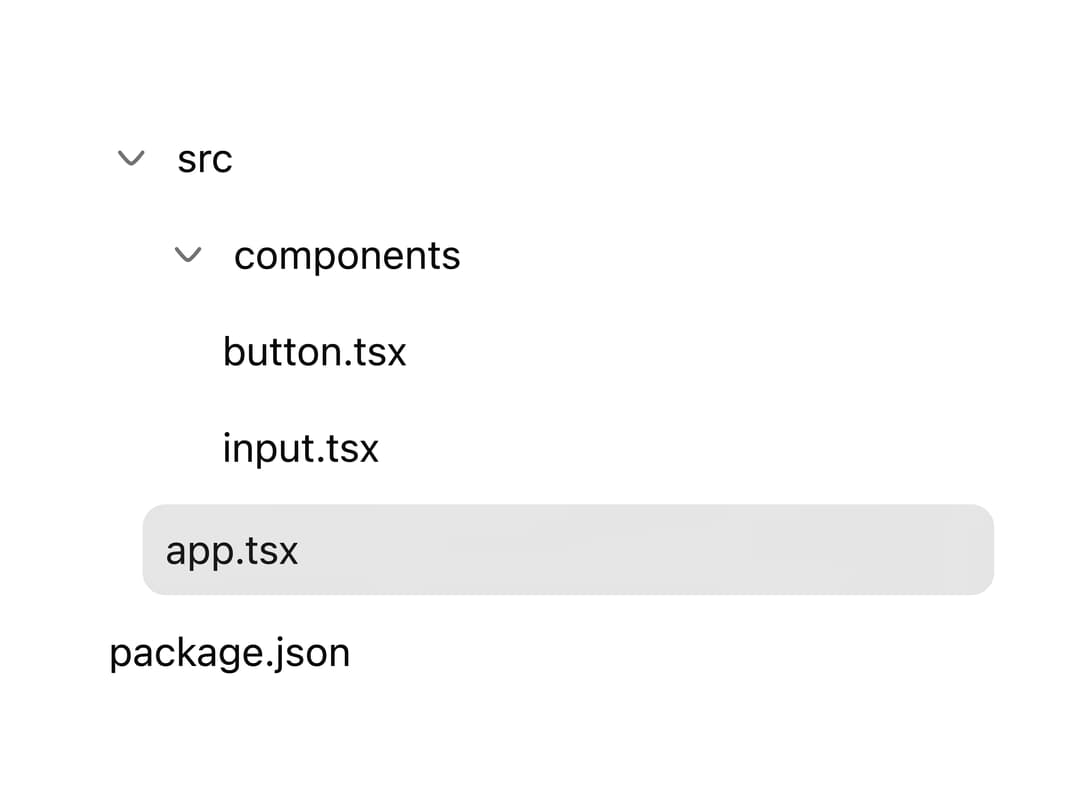
A hierarchical, keyboard-navigable tree view for file explorers, nav menus, or category pickers, with support for selection, multi-select checkboxes, expand/collapse, icons, badges, and async-loaded children.
Built with React and Tailwind. Copy the prompt and paste it into Claude Code, Cursor or Lovable: your agent adds Tree to your project and fits it to your theme.
Code
How Tree is used: the demo's code. The component's own source comes with a free account.
Usage.tsx
"use client";

import * as React from "react";
import {
  Tree,
  TreeItem,
  TreeItemLabel,
  type TreeNode,
} from "@/components/ui/tree";

const data: TreeNode[] = [
  {
    id: "src",
    name: "src",
    children: [
      {
        id: "components",
        name: "components",
        children: [
          { id: "button.tsx", name: "button.tsx" },
          { id: "input.tsx", name: "input.tsx" },
        ],
      },
      { id: "app.tsx", name: "app.tsx" },
    ],
  },
  { id: "package.json", name: "package.json" },
];

export default function TreeDemo() {
  const [selected, setSelected] = React.useState<string | null>("app.tsx");

  return (
    <div className="w-full max-w-xs">
      <Tree
        data={data}
        selectedNode={selected}
        onNodeSelect={setSelected}
        defaultExpanded={["src", "components"]}
      >
        {(item) => (
          <TreeItem>
            <TreeItemLabel>{item.name}</TreeItemLabel>
          </TreeItem>
        )}
      </Tree>
    </div>
  );
}
Dependencies
More by cubby-ui
View all
Timeline
171
Copy Button
6
Autocomplete
4
Code Block
Date Range Picker
Toolbar
OTP Field

Fancy Button