
About
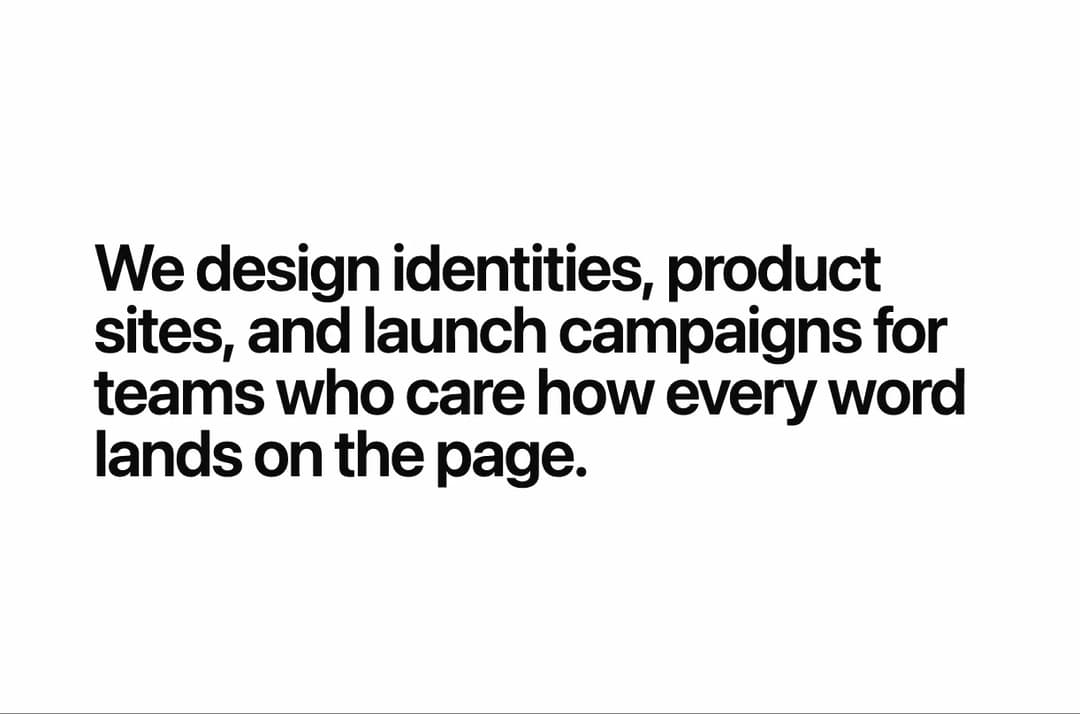
Scroll-triggered text reveal where colored blocks sweep across each line, sized to the type, with light/dark theming, responsive line splitting, and reduced-motion support.
Built with React and Tailwind. Copy the prompt and paste it into Claude Code, Cursor or Lovable: your agent adds Rectangular Text Reveal to your project and fits it to your theme.
Code
How Rectangular Text Reveal is used: the demo's code. The component's own source comes with a free account.
Usage.tsx
"use client";

import * as React from "react";
import RectangularTextReveal, { type RectangularTextRevealDirection } from "@/components/ui/rectangular-text-reveal";

const settings = {
  direction: "left",
  baseColor: "#ea580c",
  overlayColor: "#111111",
  useOverlay: true,
  stagger: 0.2,
  coverDuration: 0.34,
  revealDuration: 0.42,
};

export default function RectangularTextRevealDemo(props: Partial<typeof settings>) {
  const s = { ...settings, ...props };
  const [run, setRun] = React.useState(0);

  const reveal = {
    direction: s.direction as RectangularTextRevealDirection,
    baseColor: s.baseColor,
    // Hex keeps a color picker in the Controls panel; until it's changed, the
    // component's own theme-aware default (the foreground color) is used.
    overlayColor: s.overlayColor === settings.overlayColor ? undefined : s.overlayColor,
    stagger: s.stagger,
    coverDuration: s.coverDuration,
    revealDuration: s.revealDuration,
  };

  return (
    <main className="relative flex min-h-screen w-full items-center bg-background px-6 py-24 text-foreground sm:px-12">
      <section key={run} className="mx-auto w-full max-w-5xl">
        <RectangularTextReveal
          as="h1"
          {...reveal}
          useOverlay={s.useOverlay}
          className="text-[2.295rem] font-semibold leading-[0.95] tracking-tight sm:text-[3.4425rem] lg:text-[4.59rem]"
        >
          We design identities, product sites, and launch campaigns for teams
          who care how every word lands on the page.
        </RectangularTextReveal>
      </section>

      <button
        type="button"
        onClick={() => setRun((n) => n + 1)}
        className="absolute bottom-6 right-6 rounded-full border border-border bg-background px-4 py-2 text-sm font-medium text-foreground transition-colors hover:bg-muted focus-visible:outline-none focus-visible:ring-2 focus-visible:ring-ring"
      >
        Replay
      </button>
    </main>
  );
}
Dependencies
More by Hyperiux Vault
View all

Product Timeline
2.3K
Stack Spread
1.3K
Arrow Fill Button
912
Interactive List Preview
869
Shiny Button
750
Circular Split Roll
641
Zoom Slider
430
Stack Loader
371
More in Text
View all

Vertical Cut Reveal Characters
103

Rainbow Text Effect
47
Motion Blur Text
36
Text Loop
310
Text Reveal
27
Apple Hello Effect
610
Typography
4

Animated Text
8

