
About
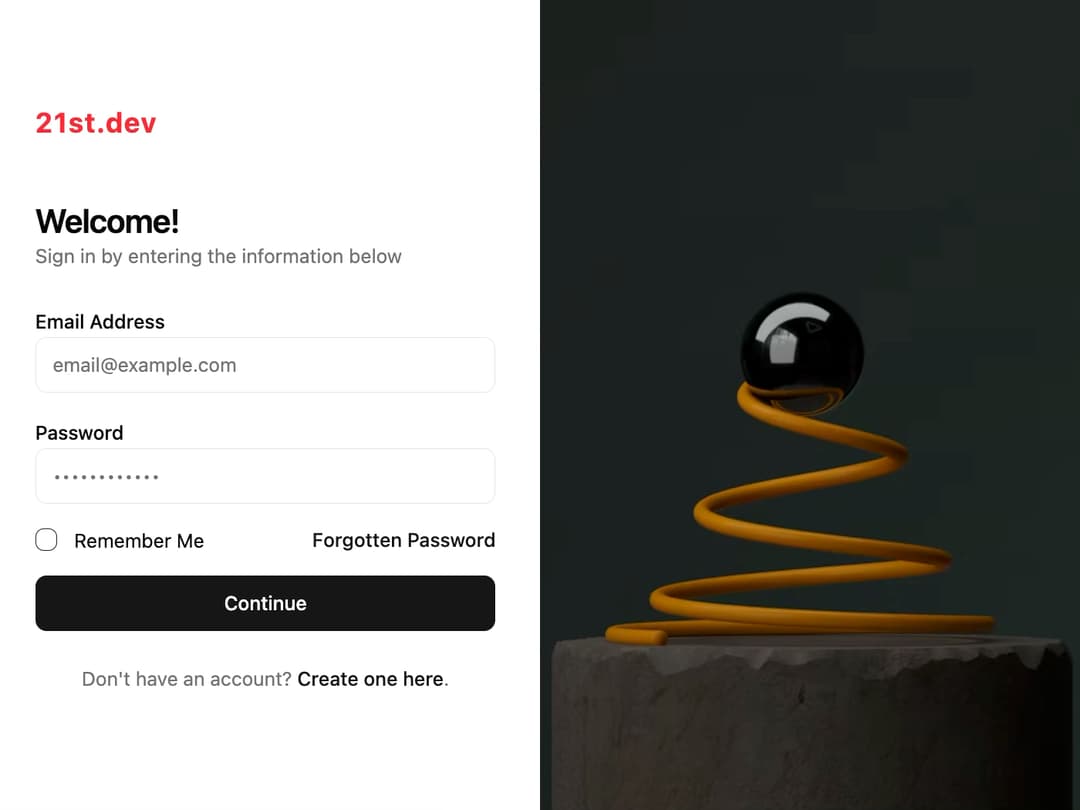
Auth Form Split Screen This component provides a full-page, two-column layout for user authentication. The left panel contains the form, and the right panel displays a promotional image. It's built to be highly reusable, allowing you to customize the logo, titles, image, and form submission logic via props.
Built with React and Tailwind. Copy the prompt and paste it into Claude Code, Cursor or Lovable: your agent adds Login to your project and fits it to your theme.
Code
How Login is used: the demo's code. The component's own source comes with a free account.
Usage.tsx
import { AuthFormSplitScreen } from "@/components/ui/login";

// A simple utility to simulate an API call
const sleep = (ms: number) => new Promise((resolve) => setTimeout(resolve, ms));

export default function AuthFormSplitScreenDemo() {
  // Define the submission handler
  const handleLogin = async (data: any) => {
    console.log("Form submitted with:", data);
    // Simulate network request
    await sleep(2000);
    // You could throw an error here to test the error state
    // throw new Error("Invalid credentials");
    alert("Login successful!");
  };

  return (
    <AuthFormSplitScreen
      logo={
        <h1 className="text-xl font-bold text-red-500 tracking-wider">21st.dev</h1>
      }
      title="Welcome!"
      description="Sign in by entering the information below"
      imageSrc="https://cdn.21st.dev/assets/mirror/77/77284ad97d21e0dee793a11589164ab18f735a615b2cb38498848185ff58da92.jpg"
      imageAlt="A beautiful landscape with rolling hills and a road."
      onSubmit={handleLogin}
      forgotPasswordHref="#"
      createAccountHref="#"
    />
  );
}
Dependencies
More by LaviKatiyar
View all
Hero Section
801
Cards
564
Service Card
546
Card
505
Alert Toast
481
Bento Grid
381
Freelancer Profile Card
358
Referral Card
289
More in Sign-in
View all
SignInPage
631

Modern & Stunning sign in
1.6K

Sign In Form
201
Clean & Minimal sign in
617
Sign In
97

Split Sign In Form
16

Login 2
7
Modern Animated Sign In
1.1K


